Showing posts with label Incremental Update. Show all posts

Friday, March 3, 2017

Incremental Updates in Apache Hadoop or Hive


1. Keep the Master Data. This is one-time, initial load of the data.

2. Load the Delta Data (newly added and updated data) into HDFS at different location.

3. Merge the data: Join the master and delta data together on the business key field(s).

4. Compact the data: After the merge you will have one or more records for each business key. Keep the most recently updated data for each business key.

5. Write the Data to a Temporary Output: Since most Hadoop jobs (e.g. MapReduce) cannot overwrite an existing directory, you must write the compacted data to a temporary output location.

6. Overwrite the original master data with temporary output.


High Level:

  • Ingest. Complete (base_table) table movement followed by Change (incremental_table) records only.
  • Reconcile. Creating a Single View of Base + Change records (reconcile_view) to reflect the most up-to-date record set.
  • Compact. Creating a Reporting table (reporting_table) from the reconciled view.
  • Purge. Replacing the Base table with Reporting table contents and deleting any previously processed Change records before the next Data Ingestion cycle.


Wednesday, December 21, 2016

Sqoop incremental mode to get updated data

Delta data imports


In real-time scenario, we may need to synchronize the delta data (modified or updated data) from RDBMS to HDFS. Sqoop has incremental load command to facilitate the delta data.

Table 4. Incremental import arguments:

ArgumentDescription
--check-column (col)Specifies the column to be examined when determining which rows to import.
--incremental (mode)Specifies how Sqoop determines which rows are new. Legal values for mode include append and lastmodified.
--last-value (value)Specifies the maximum value of the check column from the previous import.

sqoop-increamental-append


OR

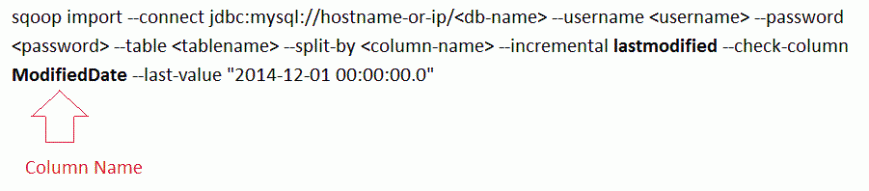
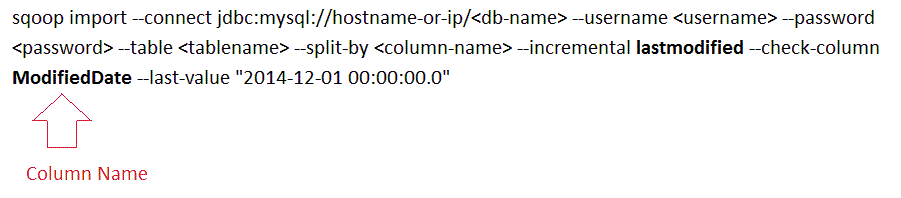
Importing incremental data with Last-modified mode option
sqoop-increamental-last-modified


Workaround for delta data import
Sqoop is importing and saving as RDBMS table name as a file in HDFS. The last modified mode is importing the delta data and trying to save the same name which already present in HDFS side and it throw error since HDFS does not allow the same name file.
Here is workaround to get complete updated data in HDFS side
1. Move existing HDFS data to temporary folder
2. Run last modified mode fresh import
3. Merge with this fresh import with old data which saved in temporary folder.
Reference: https://sqoop.apache.org/docs/1.4.2/SqoopUserGuide.html#_incremental_imports