Showing posts with label bigdata. Show all posts

Monday, June 24, 2019

Kafka and Kafka Performance Tuning

What is Kafka?

Apache Kafka® is a distributed streaming platform.

A streaming platform has three key capabilities:

Publish and subscribe to streams of records, similar to a message queue or enterprise messaging system.
Store streams of records in a fault-tolerant durable way.
Process streams of records as they occur.
Kafka is generally used for two broad classes of applications:

Building real-time streaming data pipelines that reliably get data between systems or applications
Building real-time streaming applications that transform or react to the streams of data

List the various components in Kafka.

The four major components of Kafka are:
  • Topic – a stream of messages belonging to the same type
  • Producer – that can publish messages to a topic
  • Brokers – a set of servers where the publishes messages are stored
  • Consumer – that subscribes to various topics and pulls data from the brokers.

Explain the role of the offset.

Messages contained in the partitions are assigned a unique ID number that is called the offset. The role of the offset is to uniquely identify every message within the partition.

What is a Consumer Group?

Consumer Groups is a concept exclusive to Kafka.  Every Kafka consumer group consists of one or more consumers that jointly consume a set of subscribed topics.

What is the role of the ZooKeeper in Kafka?

Kafka uses Zookeeper to store offsets of messages consumed for a specific topic and partition by a specific Consumer Group.

Is it possible to use Kafka without ZooKeeper?

No, it is not possible to bypass Zookeeper and connect directly to the Kafka server. If, for some reason, ZooKeeper is down, you cannot service any client request.

Explain the concept of Leader and Follower.

Every partition in Kafka has one server which plays the role of a Leader, and none or more servers that act as Followers. The Leader performs the task of all read and write requests for the partition, while the role of the Followers is to passively replicate the leader. In the event of the Leader failing, one of the Followers will take on the role of the Leader. This ensures load balancing of the server.

How do you define a Partitioning Key?

Within the Producer, the role of a Partitioning Key is to indicate the destination partition of the message. By default, a hashing-based Partitioner is used to determine the partition ID given the key. Alternatively, users can also use customized Partitions.
What is the purpose of retention period in Kafka cluster?
However, retention period retains all the published records within the Kafka cluster. It doesn’t check whether they have been consumed or not. Moreover, the records can be discarded by using a configuration setting for the retention period. And, it results as it can free up some space.
What is Mirror Maker ?
Mirror Maker tool helps to offer to mirror of one Kafka cluster to another.

Kafka Performance Tuning

Performance tuning involves two important metrics:
  • Latency measures how long it takes to process one event.
  • Throughput measures how many events arrive within a specific amount of time.
Most systems are optimized for either latency or throughput. Kafka is balanced for both. A well-tuned Kafka system has just enough brokers to handle topic throughput, given the latency required to process information as it is received.
Tuning your producers, brokers, and consumers to send, process, and receive the largest possible batches within a manageable amount of time results in the best balance of latency and throughput for your Kafka cluster.
The following sections introduce the concepts you'll need to be able to balance your Kafka workload and then provide practical tuning configuration to address specific circumstances.
For a quick video introduction to tuning Kafka, see Tuning Your Apache Kafka Cluster.

Tuning Brokers

Topics are divided into partitions. Each partition has a leader. Topics that are properly configured for reliability will consist of a leader partition and 2 or more follower partitions. When the leaders are not balanced properly, one might be overworked, compared to others.
Depending on your system and how critical your data is, you want to be sure that you have sufficient replication sets to preserve your data. For each topic, Cloudera recommends starting with one partition per physical storage disk and one consumer per partition.

Tuning Producers

Kafka uses an asynchronous publish/subscribe model. When your producer calls send(), the result returned is a future. The future provides methods to let you check the status of the information in process. When the batch is ready, the producer sends it to the broker. The Kafka broker waits for an event, receives the result, and then responds that the transaction is complete.
If you do not use a future, you could get just one record, wait for the result, and then send a response. Latency is very low, but so is throughput. If each transaction takes 5 ms, throughput is 200 events per second — slower than the expected 100,000 events per second.
When you use Producer.send(), you fill up buffers on the producer. When a buffer is full, the producer sends the buffer to the Kafka broker and begins to refill the buffer.
Two parameters are particularly important for latency and throughput: batch size and linger time.

Batch Size

batch.size measures batch size in total bytes instead of the number of messages. It controls how many bytes of data to collect before sending messages to the Kafka broker. Set this as high as possible, without exceeding available memory. The default value is 16384.
If you increase the size of your buffer, it might never get full. The Producer sends the information eventually, based on other triggers, such as linger time in milliseconds. Although you can impair memory usage by setting the buffer batch size too high, this does not impact latency.
If your producer is sending all the time, you are probably getting the best throughput possible. If the producer is often idle, you might not be writing enough data to warrant the current allocation of resources.

Linger Time

linger.ms sets the maximum time to buffer data in asynchronous mode. For example, the setting of 100 means that it batches 100ms of messages to send at once. This improves throughput, but the buffering adds message delivery latency.
By default, the producer does not wait. It sends the buffer any time data is available.
Instead of sending immediately, you can set linger.ms to 5 and send more messages in one batch. This would reduce the number of requests sent, but would add up to 5 milliseconds of latency to records sent, even if the load on the system does not warrant the delay.
The farther away the broker is from the producer, the more overhead required to send messages. Increase linger.ms for higher latency and higher throughput in your producer.

Tuning Consumers

Consumers can create throughput issues on the other side of the pipeline. The maximum number of consumers in a consumer group for a topic is equal to the number of partitions. You need enough partitions to handle all the consumers needed to keep up with the producers.
Consumers in the same consumer group split the partitions among them. Adding more consumers to a group can enhance performance (up to the number of partitions). Adding more consumer groups does not affect performance.

HBase

Apache HBase is a NoSQL column oriented database which is used to store the sparse data sets. It runs on top of the Hadoop distributed file system (HDFS) and it can store any kind of data.

Use Apache HBase™ when you need random, realtime read/write access to your Big Data. This project's goal is the hosting of very large tables -- billions of rows X millions of columns -- atop clusters of commodity hardware. Apache HBase is an open-source, distributed, versioned, non-relational database modeled after Google's Bigtable: A Distributed Storage System for Structured Data.

Features:

Linear and modular scalability.
Strictly consistent reads and writes.
Automatic and configurable sharding of tables
Automatic failover support between RegionServers.
Convenient base classes for backing Hadoop MapReduce jobs with Apache HBase tables.
Easy to use Java API for client access.
Block cache and Bloom Filters for real-time queries.
Query predicate push down via server side Filters
Thrift gateway and a REST-ful Web service that supports XML, Protobuf, and binary data encoding options
Extensible jruby-based (JIRB) shell
Support for exporting metrics via the Hadoop metrics subsystem to files or Ganglia; or via JMX


What are the key components of HBase?

The key components of HBase are Zookeeper, RegionServer and HBase Master. 

Key components of HBase

When would you use HBase?

  • HBase is used in cases where we need random read and write operations and it can perform a number of operations per second on a large data sets.
  • HBase gives strong data consistency.
  • It can handle very large tables with billions of rows and millions of columns on top of commodity hardware cluster.

Define the difference between Hive and HBase?

Apache Hive is a data warehousing infrastructure built on top of Hadoop. It helps in querying data stored in HDFS for analysis using Hive Query Language (HQL), which is a SQL-like language, that gets translated into MapReduce jobs. Hive performs batch processing on Hadoop.
Apache HBase is NoSQL key/value store which runs on top of HDFS. Unlike Hive, HBase operations run in real-time on its database rather than MapReduce jobs. HBase partitions the tables, and the tables are further splitted into column families. 
Hive and HBase are two different Hadoop based technologies – Hive is an SQL-like engine that runs MapReduce jobs, and HBase is a NoSQL key/value database of Hadoop. We can use them together. Hive can be used for analytical queries while HBase for real-time querying. Data can even be read and written from HBase to Hive and vice-versa.

Explain the data model of HBase.

HBase comprises of:
  • Set of tables.
  • Each table consists of column families and rows.
  • Row key acts as a Primary key in HBase.
  • Any access to HBase tables uses this Primary Key.
  • Each column qualifier present in HBase denotes attributes corresponding to the object which resides in the cell.

Define column families?

Column Family is a collection of columns, whereas row is a collection of column families.

What is RegionServer?

A table can be divided into several regions. A group of regions is served to the clients by a Region Server.

What is the use of ZooKeeper?

The ZooKeeper is used to maintain the configuration information and communication between region servers and clients. It also provides distributed synchronization. It helps in maintaining server state inside the cluster by communicating through sessions.
Every Region Server along with HMaster Server sends continuous heartbeat at regular interval to Zookeeper and it checks which server is alive and available. It also provides server failure notifications so that, recovery measures can be executed.

Define catalog tables in HBase?

Catalog tables are used to maintain the metadata information.

How HBase Handles the write failure?

Failures are common in large distributed systems, and HBase is no exception.
If the server hosting a MemStore that has not yet been flushed crashes. The data that was in memory, but not yet persisted are lost. HBase safeguards against that by writing to the WAL (Write Ahead Log)  before the write completes. Every server that’s part of the.
HBase cluster keeps a WAL to record changes as they happen. The WAL is a file on the underlying file system. A write isn’t considered successful until the new WAL entry is successfully written. This guarantee makes HBase as durable as the file system backing it. Most of the time, HBase is backed by the Hadoop Distributed Filesystem (HDFS). If HBase goes down, the data that were not yet flushed from the MemStore to the HFile can be recovered by replaying the WAL.

What is a Bloom filter and how does it help in searching rows?

HBase supports Bloom Filter to improve the overall throughput of the cluster. A HBase Bloom Filter  is a space efficient mechanism to test whether a HFile contains a specific row or row-col cell.
Without Bloom Filter, the only way to decide if a row key is present in a HFile  is to check the HFile’s block index, which stores the start row key of each block in the HFile. There are many rows drops between the two start keys. So, HBase has to load the block and scan the block’s keys to figure out if that row key actually exists.
How will you implement joins in HBase?
HBase, not support joins directly but uses MapReduce jobs join queries can be implemented by retrieving data with the help of different HBase tables.
HBase Shell Commands:
ComponentDescription
Region ServerA table can be divided into several regions. A group of regions is served to the clients by a Region Server
HMasterIt coordinates and manages the Region Servers (similar as NameNode manages DataNodes in HDFS).
ZooKeeperZookeeper acts like as a coordinator inside HBase distributed environment. It helps in maintaining server state inside the cluster by communicating through sessions.

Apache Zookeeper

Apache ZooKeeper : Highly reliable distributed co-ordination service. 

Apache ZooKeeper is an effort to develop and maintain an open-source server which enables highly reliable distributed coordination.

What is ZooKeeper?


ZooKeeper is a centralized service for maintaining configuration information, naming, providing distributed synchronization, and providing group services. All of these kinds of services are used in some form or another by distributed applications. Each time they are implemented there is a lot of work that goes into fixing the bugs and race conditions that are inevitable. Because of the difficulty of implementing these kinds of services, applications initially usually skimp on them, which make them brittle in the presence of change and difficult to manage. Even when done correctly, different implementations of these services lead to management complexity when the applications are deployed.

HBase uses ZooKeeper as a distributed coordination service to maintain server state in the cluster. Zookeeper maintains which servers are alive and available, and provides server failure notification. Zookeeper uses consensus to guarantee common shared state.

Thursday, August 18, 2016

Install Kafka on Linux

Step 1: Download the code

Download the 0.10.0.0 release and un-tar it.
> tar -xzf kafka_2.11-0.10.0.0.tgz
> cd kafka_2.11-0.10.0.0

Step 2: Start the server

Kafka uses ZooKeeper so you need to first start a ZooKeeper server if you don't already have one. You can use the convenience script packaged with kafka to get a quick-and-dirty single-node ZooKeeper instance.
> bin/zookeeper-server-start.sh config/zookeeper.properties
[2013-04-22 15:01:37,495] INFO Reading configuration from: config/zookeeper.properties (org.apache.zookeeper.server.quorum.QuorumPeerConfig)
...
Now start the Kafka server:
> bin/kafka-server-start.sh config/server.properties
[2013-04-22 15:01:47,028] INFO Verifying properties (kafka.utils.VerifiableProperties)
[2013-04-22 15:01:47,051] INFO Property socket.send.buffer.bytes is overridden to 1048576 (kafka.utils.VerifiableProperties)
...

Step 3: Create a topic

Let's create a topic named "test" with a single partition and only one replica:
> bin/kafka-topics.sh --create --zookeeper localhost:2181 --replication-factor 1 --partitions 1 --topic test
We can now see that topic if we run the list topic command:
> bin/kafka-topics.sh --list --zookeeper localhost:2181
test
Alternatively, instead of manually creating topics you can also configure your brokers to auto-create topics when a non-existent topic is published to.

Step 4: Send some messages

Kafka comes with a command line client that will take input from a file or from standard input and send it out as messages to the Kafka cluster. By default each line will be sent as a separate message.
Run the producer and then type a few messages into the console to send to the server.
> bin/kafka-console-producer.sh --broker-list localhost:9092 --topic test
This is a message
This is another message

Step 5: Start a consumer

Kafka also has a command line consumer that will dump out messages to standard output.
> bin/kafka-console-consumer.sh --zookeeper localhost:2181 --topic test --from-beginning
This is a message
This is another message
If you have each of the above commands running in a different terminal then you should now be able to type messages into the producer terminal and see them appear in the consumer terminal.
All of the command line tools have additional options; running the command with no arguments will display usage information documenting them in more detail.

Step 6: Setting up a multi-broker cluster

So far we have been running against a single broker, but that's no fun. For Kafka, a single broker is just a cluster of size one, so nothing much changes other than starting a few more broker instances. But just to get feel for it, let's expand our cluster to three nodes (still all on our local machine).
First we make a config file for each of the brokers:
> cp config/server.properties config/server-1.properties
> cp config/server.properties config/server-2.properties
Now edit these new files and set the following properties:
config/server-1.properties:
    broker.id=1
    listeners=PLAINTEXT://:9093
    log.dir=/tmp/kafka-logs-1

config/server-2.properties:
    broker.id=2
    listeners=PLAINTEXT://:9094
    log.dir=/tmp/kafka-logs-2
The broker.id property is the unique and permanent name of each node in the cluster. We have to override the port and log directory only because we are running these all on the same machine and we want to keep the brokers from all trying to register on the same port or overwrite each others data.
We already have Zookeeper and our single node started, so we just need to start the two new nodes:
> bin/kafka-server-start.sh config/server-1.properties &
...
> bin/kafka-server-start.sh config/server-2.properties &
...
Now create a new topic with a replication factor of three:
> bin/kafka-topics.sh --create --zookeeper localhost:2181 --replication-factor 3 --partitions 1 --topic my-replicated-topic
Okay but now that we have a cluster how can we know which broker is doing what? To see that run the "describe topics" command:
> bin/kafka-topics.sh --describe --zookeeper localhost:2181 --topic my-replicated-topic
Topic:my-replicated-topic PartitionCount:1 ReplicationFactor:3 Configs:
 Topic: my-replicated-topic Partition: 0 Leader: 1 Replicas: 1,2,0 Isr: 1,2,0
Here is an explanation of output. The first line gives a summary of all the partitions, each additional line gives information about one partition. Since we have only one partition for this topic there is only one line.
  • "leader" is the node responsible for all reads and writes for the given partition. Each node will be the leader for a randomly selected portion of the partitions.
  • "replicas" is the list of nodes that replicate the log for this partition regardless of whether they are the leader or even if they are currently alive.
  • "isr" is the set of "in-sync" replicas. This is the subset of the replicas list that is currently alive and caught-up to the leader.
Note that in my example node 1 is the leader for the only partition of the topic.
We can run the same command on the original topic we created to see where it is:
> bin/kafka-topics.sh --describe --zookeeper localhost:2181 --topic test
Topic:test PartitionCount:1 ReplicationFactor:1 Configs:
 Topic: test Partition: 0 Leader: 0 Replicas: 0 Isr: 0
So there is no surprise there—the original topic has no replicas and is on server 0, the only server in our cluster when we created it.
Let's publish a few messages to our new topic:
> bin/kafka-console-producer.sh --broker-list localhost:9092 --topic my-replicated-topic
...
my test message 1
my test message 2
^C
Now let's consume these messages:
> bin/kafka-console-consumer.sh --zookeeper localhost:2181 --from-beginning --topic my-replicated-topic
...
my test message 1
my test message 2
^C
Now let's test out fault-tolerance. Broker 1 was acting as the leader so let's kill it:
> ps | grep server-1.properties
7564 ttys002    0:15.91 /System/Library/Frameworks/JavaVM.framework/Versions/1.8/Home/bin/java...
> kill -9 7564
Leadership has switched to one of the slaves and node 1 is no longer in the in-sync replica set:
> bin/kafka-topics.sh --describe --zookeeper localhost:2181 --topic my-replicated-topic
Topic:my-replicated-topic PartitionCount:1 ReplicationFactor:3 Configs:
 Topic: my-replicated-topic Partition: 0 Leader: 2 Replicas: 1,2,0 Isr: 2,0
But the messages are still be available for consumption even though the leader that took the writes originally is down:
> bin/kafka-console-consumer.sh --zookeeper localhost:2181 --from-beginning --topic my-replicated-topic
...
my test message 1
my test message 2
^C

Step 7: Use Kafka Connect to import/export data

Writing data from the console and writing it back to the console is a convenient place to start, but you'll probably want to use data from other sources or export data from Kafka to other systems. For many systems, instead of writing custom integration code you can use Kafka Connect to import or export data. Kafka Connect is a tool included with Kafka that imports and exports data to Kafka. It is an extensible tool that runsconnectors, which implement the custom logic for interacting with an external system. In this quickstart we'll see how to run Kafka Connect with simple connectors that import data from a file to a Kafka topic and export data from a Kafka topic to a file. First, we'll start by creating some seed data to test with:
> echo -e "foo\nbar" > test.txt
Next, we'll start two connectors running in standalone mode, which means they run in a single, local, dedicated process. We provide three configuration files as parameters. The first is always the configuration for the Kafka Connect process, containing common configuration such as the Kafka brokers to connect to and the serialization format for data. The remaining configuration files each specify a connector to create. These files include a unique connector name, the connector class to instantiate, and any other configuration required by the connector.
> bin/connect-standalone.sh config/connect-standalone.properties config/connect-file-source.properties config/connect-file-sink.properties
These sample configuration files, included with Kafka, use the default local cluster configuration you started earlier and create two connectors: the first is a source connector that reads lines from an input file and produces each to a Kafka topic and the second is a sink connector that reads messages from a Kafka topic and produces each as a line in an output file. During startup you'll see a number of log messages, including some indicating that the connectors are being instantiated. Once the Kafka Connect process has started, the source connector should start reading lines from
test.txt
and producing them to the topic
connect-test
, and the sink connector should start reading messages from the topic
connect-test
and write them to the file
test.sink.txt
. We can verify the data has been delivered through the entire pipeline by examining the contents of the output file:
> cat test.sink.txt
foo
bar
Note that the data is being stored in the Kafka topic
connect-test
, so we can also run a console consumer to see the data in the topic (or use custom consumer code to process it):
> bin/kafka-console-consumer.sh --zookeeper localhost:2181 --topic connect-test --from-beginning
{"schema":{"type":"string","optional":false},"payload":"foo"}
{"schema":{"type":"string","optional":false},"payload":"bar"}
...
The connectors continue to process data, so we can add data to the file and see it move through the pipeline:
> echo "Another line" >> test.txt
You should see the line appear in the console consumer output and in the sink file.

Step 8: Use Kafka Streams to process data

Kafka Streams is a client library of Kafka for real-time stream processing and analyzing data stored in Kafka brokers. This quickstart example will demonstrate how to run a streaming application coded in this library. Here is the gist of the WordCountDemo example code (converted to use Java 8 lambda expressions for easy reading).
KTable wordCounts = textLines
    // Split each text line, by whitespace, into words.
    .flatMapValues(value -> Arrays.asList(value.toLowerCase().split("\\W+")))

    // Ensure the words are available as record keys for the next aggregate operation.
    .map((key, value) -> new KeyValue<>(value, value))

    // Count the occurrences of each word (record key) and store the results into a table named "Counts".
    .countByKey("Counts")
It implements the WordCount algorithm, which computes a word occurrence histogram from the input text. However, unlike other WordCount examples you might have seen before that operate on bounded data, the WordCount demo application behaves slightly differently because it is designed to operate on an infinite, unbounded stream of data. Similar to the bounded variant, it is a stateful algorithm that tracks and updates the counts of words. However, since it must assume potentially unbounded input data, it will periodically output its current state and results while continuing to process more data because it cannot know when it has processed "all" the input data.
We will now prepare input data to a Kafka topic, which will subsequently processed by a Kafka Streams application.
> echo -e "all streams lead to kafka\nhello kafka streams\njoin kafka summit" > file-input.txt
Next, we send this input data to the input topic named streams-file-input using the console producer (in practice, stream data will likely be flowing continuously into Kafka where the application will be up and running):
> bin/kafka-topics.sh --create \
            --zookeeper localhost:2181 \
            --replication-factor 1 \
            --partitions 1 \
            --topic streams-file-input
> cat file-input.txt | bin/kafka-console-producer.sh --broker-list localhost:9092 --topic streams-file-input
We can now run the WordCount demo application to process the input data:
> bin/kafka-run-class.sh org.apache.kafka.streams.examples.wordcount.WordCountDemo
There won't be any STDOUT output except log entries as the results are continuously written back into another topic named streams-wordcount-output in Kafka. The demo will run for a few seconds and then, unlike typical stream processing applications, terminate automatically.
We can now inspect the output of the WordCount demo application by reading from its output topic:
> bin/kafka-console-consumer.sh --zookeeper localhost:2181 \
            --topic streams-wordcount-output \
            --from-beginning \
            --formatter kafka.tools.DefaultMessageFormatter \
            --property print.key=true \
            --property print.value=true \
            --property key.deserializer=org.apache.kafka.common.serialization.StringDeserializer \
            --property value.deserializer=org.apache.kafka.common.serialization.LongDeserializer
with the following output data being printed to the console:
all     1
streams 1
lead    1
to      1
kafka   1
hello   1
kafka   2
streams 2
join    1
kafka   3
summit  1
Here, the first column is the Kafka message key, and the second column is the message value, both in injava.lang.String format. Note that the output is actually a continuous stream of updates, where each data record (i.e. each line in the original output above) is an updated count of a single word, aka record key such as "kafka". For multiple records with the same key, each later record is an update of the previous one.
Now you can write more input messages to the streams-file-input topic and observe additional messages added to streams-wordcount-output topic, reflecting updated word counts (e.g., using the console producer and the console consumer, as described above).
You can stop the console consumer via Ctrl-C.

Friday, January 29, 2016

Apache Flume, Apache Kafka

What is Apache Flume?
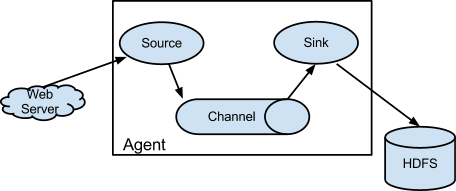
Flume is a distributed, reliable, and available service for efficiently collecting, aggregating, and moving large amounts of log data. It has a simple and flexible architecture based on streaming data flows. It is robust and fault tolerant with tunable reliability mechanisms and many failover and recovery mechanisms. It uses a simple extensible data model that allows for online analytic application.
Agent component diagram
Flume is a distributed, reliable, and available system for efficiently collecting, aggregating, and moving large amounts of data from many different sources to a centralized data store, such as HDFS or HBase. It is more tightly integrated with Hadoop ecosystem. For example, the flume HDFS sink integrates with the HDFS security very well. So its common use case is to act as a data pipeline to ingest data into Hadoop.
What is Apache Kafka?
Apache Kafka is publish-subscribe messaging rethought as a distributed commit log. A high-throughput distributed messaging system. 
Kafka is a general purpose publish-subscribe model messaging system, which offers strong durability, scalability and fault-tolerance support. It is not specifically designed for Hadoop. Hadoop ecosystem is just be one of its possible consumers.
Kafka Vs Flume
Compared to Flume, Kafka wins on the its superb scalability and messsage durablity.
Kafka is very scalable. One of the key benefits of Kafka is that it is very easy to add large number of consumers without affecting performance and without down time. That’s because Kafka does not track which messages in the topic have been consumed by consumers. It simply keeps all messages in the topic within a configurable period. It is the consumers’ responsibility to do the tracking through offset.
In contrast, adding more consumers to Flume means changing the topology of Flume pipeline design, replicating the channel to deliver the messages to a new sink. It is not really a scalable solution when you have huge number of consumers. Also since the flume topology needs to be changed, it requires some down time.
Kafka’s scalability is also demonstrated by its ability to handle spike of the events. This is where Kakfa truly shines because it acts as a “shock absorber” between the producers and consumers. Kafka can handle events at 100k+ per second rate coming from producers. Because Kafka consumers pull data from the topic, different consumers can consume the messages at different pace. Kafka also supports different consumption model. You can have one consumer processing the messages at real-time and another consumer processing the messages in batch mode.

Apache Hadoop

What Is Apache Hadoop?

The Apache Hadoop is open-source software for reliable, scalable, distributed computing.
The Apache Hadoop software library is a framework that allows for the distributed processing of large data sets across clusters of computers using simple programming models. It is designed to scale up from single servers to thousands of machines, each offering local computation and storage. Rather than rely on hardware to deliver high-availability, the library itself is designed to detect and handle failures at the application layer, so delivering a highly-available service on top of a cluster of computers, each of which may be prone to failures.
  • Hadoop Distributed File System (HDFS): A distributed file system that provides high-throughput access to application data.
  • Hadoop YARN: A framework for job scheduling and cluster resource management.
  • Hadoop MapReduce: A YARN-based system for parallel processing of large data sets.
  • HBase: A scalable, distributed database that supports structured data storage for large tables.
  • Hive: A data warehouse infrastructure that provides data summarization and ad hoc querying.
  • Pig: A high-level data-flow language and execution framework for parallel computation.
  • Spark: A fast and general compute engine for Hadoop data. Spark provides a simple and expressive programming model that supports a wide range of applications, including ETL, machine learning, stream processing, and graph computation.
  • Mahout: A Scalable machine learning and data mining library.
ZooKeeper: A high-performance coordination service for distributed applications.

Hadoop 2.x

Hadoop 2.x has the following three Major Components
MapReduce
YARN
HDFS

MapReduce

MapReduce is a software framework for easily writing applications which process vast amounts of data (multi-terabyte data-sets) in-parallel on large clusters (thousands of nodes) of commodity hardware in a reliable, fault-tolerant manner.
A MapReduce job usually splits the input data-set into independent chunks which are processed by the map tasks in a completely parallel manner. The framework sorts the outputs of the maps, which are then input to thereduce tasks. Typically both the input and the output of the job are stored in a file-system. The framework takes care of scheduling tasks, monitoring them and re-executes the failed tasks.
The MapReduce framework consists of a single master ResourceManager, one slaveNodeManager per cluster-node, and MRAppMaster per application
The MapReduce framework operates exclusively on <key, value> pairs, that is, the framework views the input to the job as a set of <key, value> pairs and produces a set of<key, value> pairs as the output of the job, conceivably of different types.
The key and value classes have to be serializable by the framework and hence need to implement the Writable interface. Additionally, the key classes have to implement the WritableComparable interface to facilitate sorting by the framework.
Refer MapReduce documentation for more details.

 YARN (or MapReduce 2.0) Architecture

MapReduce has undergone a complete overhaul in hadoop-0.23 and we now have, what we call, MapReduce 2.0 (MRv2) or YARN.
The fundamental idea of MRv2 is to split up the two major functionalities of the JobTracker, resource management and job scheduling/monitoring, into separate daemons. The idea is to have a global ResourceManager (RM) and per-application ApplicationMaster (AM). An application is either a single job in the classical sense of Map-Reduce jobs or a DAG of jobs.
The ResourceManager and per-node slave, the NodeManager (NM), form the data-computation framework. The ResourceManager is the ultimate authority that arbitrates resources among all the applications in the system.
The per-application ApplicationMaster is, in effect, a framework specific library and is tasked with negotiating resources from the ResourceManager and working with the NodeManager(s) to execute and monitor the tasks.
MapReduce NextGen Architecture
The ResourceManager has two main components: Scheduler and ApplicationsManager.
The Scheduler is responsible for allocating resources to the various running applications subject to familiar constraints of capacities, queues etc. The Scheduler is pure scheduler in the sense that it performs no monitoring or tracking of status for the application. Also, it offers no guarantees about restarting failed tasks either due to application failure or hardware failures. The Scheduler performs its scheduling function based the resource requirements of the applications; it does so based on the abstract notion of a resourceContainer which incorporates elements such as memory, cpu, disk, network etc. In the first version, only memory is supported.
The Scheduler has a pluggable policy plug-in, which is responsible for partitioning the cluster resources among the various queues, applications etc. The current Map-Reduce schedulers such as the CapacityScheduler and the FairScheduler would be some examples of the plug-in.
The CapacityScheduler supports hierarchical queues to allow for more predictable sharing of cluster resources
The ApplicationsManager is responsible for accepting job-submissions, negotiating the first container for executing the application specific ApplicationMaster and provides the service for restarting the ApplicationMaster container on failure.
The NodeManager is the per-machine framework agent who is responsible for containers, monitoring their resource usage (cpu, memory, disk, network) and reporting the same to the ResourceManager/Scheduler.
The per-application ApplicationMaster has the responsibility of negotiating appropriate resource containers from the Scheduler, tracking their status and monitoring for progress.
MRV2 maintains API compatibility with previous stable release (hadoop-1.x). This means that all Map-Reduce jobs should still run unchanged on top of MRv2 with just a recompile.

HDFS Architecture

The Hadoop Distributed File System (HDFS) is a distributed file system designed to run on commodity hardware and is highly fault-tolerant.

NameNode and DataNodes

HDFS has a master/slave architecture. An HDFS cluster consists of a single NameNode, a master server that manages the file system namespace and regulates access to files by clients. In addition, there are a number of DataNodes, usually one per node in the cluster, which manage storage attached to the nodes that they run on. HDFS exposes a file system namespace and allows user data to be stored in files. Internally, a file is split into one or more blocks and these blocks are stored in a set of DataNodes. The NameNode executes file system namespace operations like opening, closing, and renaming files and directories. It also determines the mapping of blocks to DataNodes. The DataNodes are responsible for serving read and write requests from the file system’s clients. The DataNodes also perform block creation, deletion, and replication upon instruction from the NameNode.
HDFS Architecture
The NameNode and DataNode are pieces of software designed to run on commodity machines. These machines typically run a GNU/Linux operating system (OS). HDFS is built using the Java language; any machine that supports Java can run the NameNode or the DataNode software. Usage of the highly portable Java language means that HDFS can be deployed on a wide range of machines. A typical deployment has a dedicated machine that runs only the NameNode software. Each of the other machines in the cluster runs one instance of the DataNode software. The architecture does not preclude running multiple DataNodes on the same machine but in a real deployment that is rarely the case.
The existence of a single NameNode in a cluster greatly simplifies the architecture of the system. The NameNode is the arbitrator and repository for all HDFS metadata. The system is designed in such a way that user data never flows through the NameNode.