Showing posts with label Apache Kafka. Show all posts

Friday, August 23, 2019

Kafka Architecture


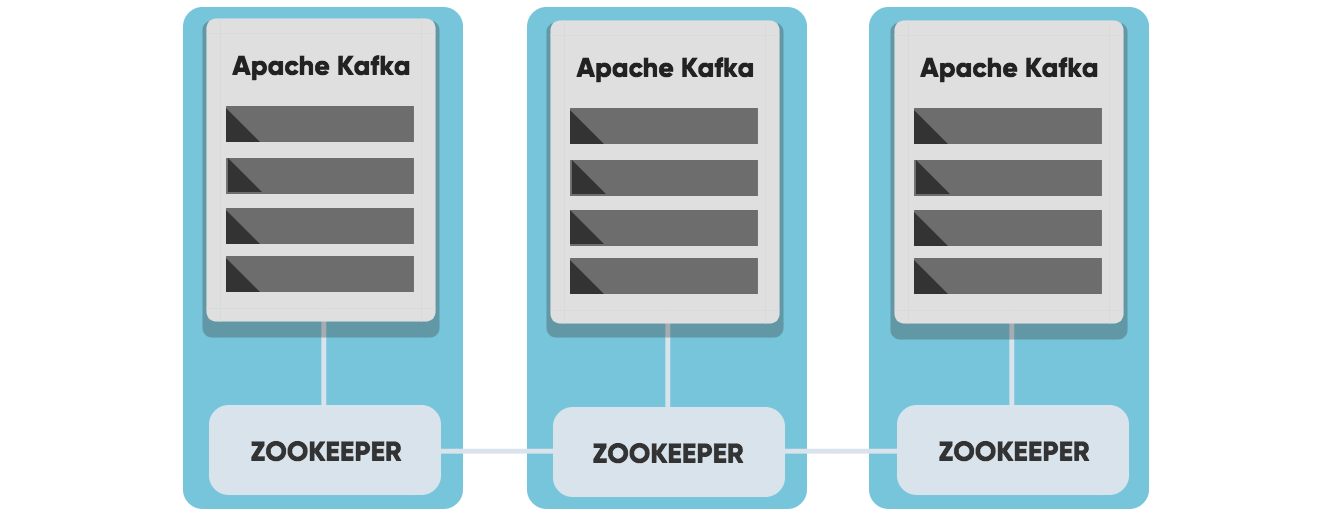
Cluster Architecture

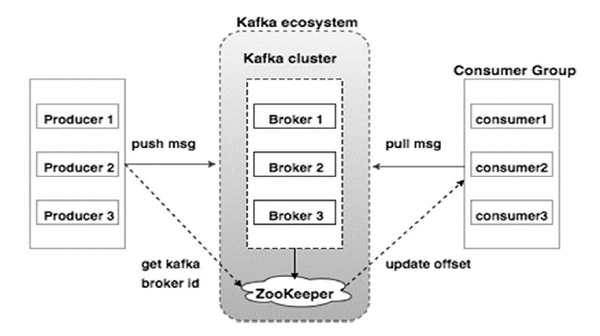
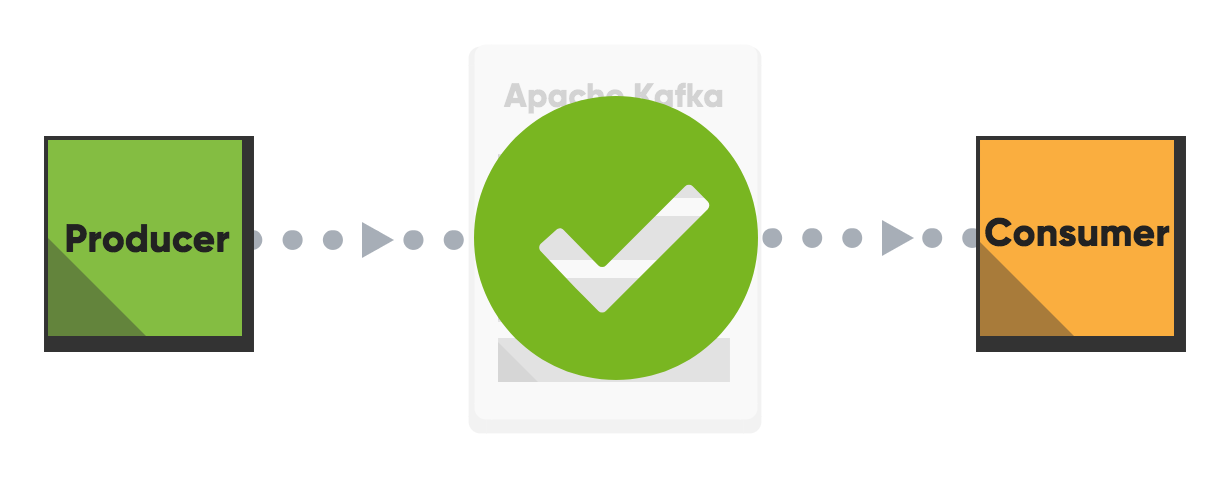
Apache Kafka Architecture and Components


Components:

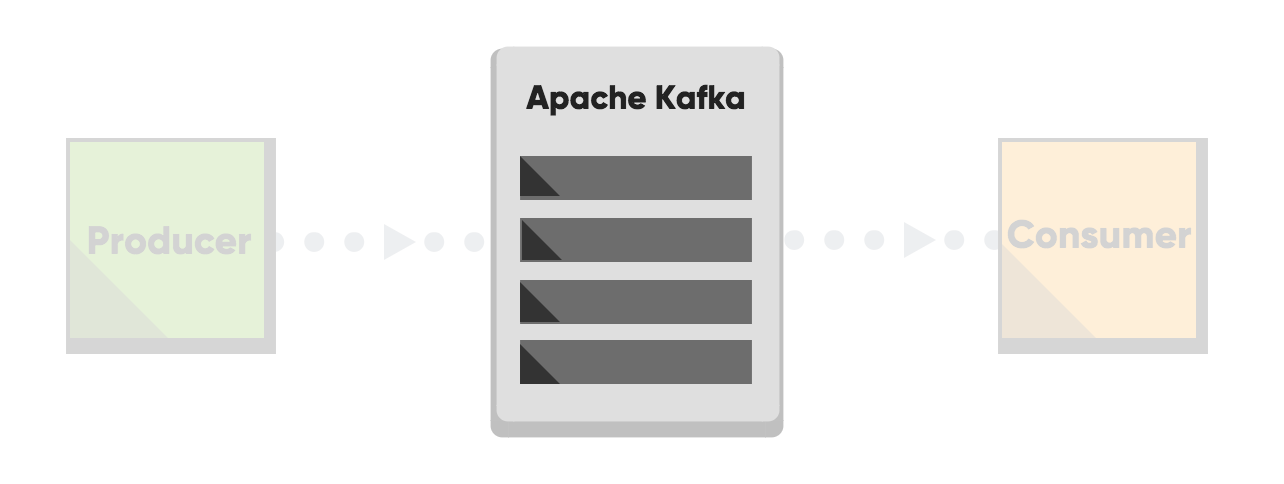
Kafka Broker : Kafka cluster typically consists of multiple brokers to maintain load balance. Kafka brokers are stateless, so they use ZooKeeper for maintaining their cluster state.

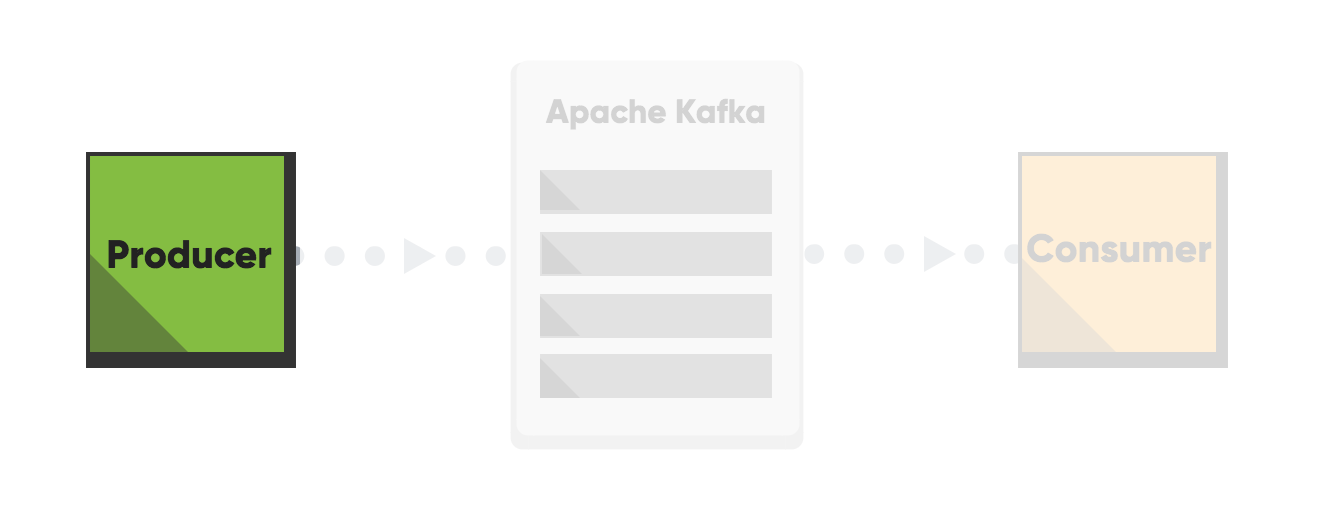
Producer : Producers publish data to the topics. Producers are the publisher of messages to one or more Kafka topics.

Consumer : Consumers read data from brokers. Consumers subscribes to one or more topics and consume published messages by pulling data from the brokers.

Topic : Stream of records. A topic is a category or feed name to which records are published.

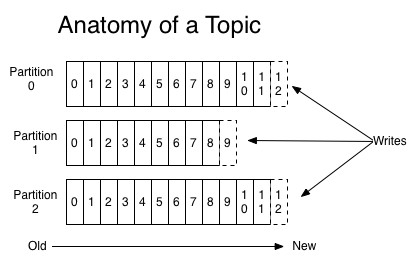
Partition: For each topic, the Kafka cluster maintains a partitioned log. Each partition is an ordered, immutable sequence of records that is continually appended to—a structured commit log. The records in the partitions are each assigned a sequential id number called the offset that uniquely identifies each record within the partition.

NoteKafka only provides a total order over records within a partition, not between different partitions in a topic. 


Monday, June 24, 2019

Kafka Quick Review

Apache Kafka Refreshment

Apache Kafka is a distributed stream processing platform for big data. It’s a fast, scalable, durable, and fault-tolerant publish-subscribe messaging system. Kafka store streams of records. Unlike most messaging systems, the log (the message queue) is persistent.
The log stream in Kafka is called a topic. Producers publish, (append), their records to a topic, and consumers subscribe to one or more topics. A Kafka topic is just a sharded write-ahead log.
Kafka uses ZooKeeper to manage the cluster, Zookeeper keeps track of the status of Kafka cluster nodes, and it also keeps track of Kafka topics, partitions, etc.


Important Concepts

Broker

A Kafka cluster consists of one or more servers called Kafka brokers. The Kafka broker is mediating the conversation between different computer systems, like a queue in a message system. Nodes in a Kafka cluster communicate by sharing information between each other directly or indirectly using Zookeeper.

Producer

A producer writes data (records) to brokers.

Consumer

A consumer reads data (records) from the brokers.

Topics

Each Broker can have one or more topics. A Topic is a category/feed name to which messages are stored and published. If you wish to send a message you send it to a specific topic and if you want to read a message you read it from a specific topic. Messages published to the cluster will stay in the cluster until a configurable retention period has passed. Kafka retains all messages for a set amount of time or until a configurable size is reached.

Partition

Topics are split into partitions, which can be replicated between nodes. Consumers cannot consume messages from the same partition at the same time.

Record

Data sent to and from the broker is called a record, a key-value pair. The record contains the topic name and partition number. The Kafka broker keeps records inside topic partitions.

Consumer group

A consumer group includes the set of consumers that are subscribing to a specific topic. Kafka consumers are typically part of a consumer group. Each consumer in the group is assigned a set of partitions from where to consume messages. Each consumer in the group will receive messages from different subsets of the partitions in the topic. Consumer groups enable multi-machine consumption from Kafka topics.

Offset

Kafka topics are divided into a number of partitions, which contains messages in an unchangeable sequence. Each message in a partition is assigned and identified by its unique offset.

ZooKeeper

Zookeeper is a software developed by Apache that acts as a centralized service and keeps track of the status of the Kafka cluster nodes, and it also keeps track of Kafka topics, partitions, etc.

Performance optimization for Apache Kafka - Producers

The producer in Kafka is responsible for writing the data to the Kafka Brokers and can be seen as the triggers in the Apache Kafka workflow. The producer can be optimized in various ways to meet the needs for your Apache Kafka setup. By refining your producer setup, you can avoid common errors and ensure your configuration meets your expectations.
This guide is divided into three parts, and this first one, will focus on the Producers.

Ack-value

An acknowledgment (ACK) is a signal passed between communicating processes to signify acknowledgment, i.e., receipt of the message sent. The ack-value is a producer configuration parameter in Apache Kafka, and can be set to following values:
  • acks=0
  • The producer never waits for an ack from the server. No guarantee can be made that the server has received the message, and the retries configuration will not take effect since the server will never know that the message was lost. This means that you got a low cost while sending your message, but you might pay your price in message durability.
  • acks=1
  • The producer gets an ack after leading replica has received the data. The leader will write the record to its local log but will respond without awaiting a full acknowledgment from all followers. The message will be lost only if the leader fails immediately after acknowledging the record, but before the followers have replicated it. This means that you got a higher cost while sending your message, and not maximum, but high, durability.
  • acks=all
  • The producer gets an ack after all-in sync replicas have received the data. The leader will wait for the full set of in-sync replicas to acknowledge the record. This means that it takes a longer time to send a message, but gives strongest message durability.

How should you set the ack value for the producer in Apache Kafka?

For the highest throughput set the value to 0. For no data loss, set the ack-value to all (or -1). For high, but not maximum durability and for high but not maximum throughput - set the ack-value to 1. Ack-value 1 can be seen as an intermediate between both of the above.

Batch messages in Apache Kafka

Messages can be sent together in a specific way as groups, called a batch. The batch can then be sent when specified criteria for the batch is met; when the number of messages for the batch has reached a certain number or after a given amount of time. Sending batches of messages is recommended since it will increase the throughput.
Always keep a good balance between building up batches and the sending rate. A small batch might give you a low throughput and lots of overhead. However, a small batch is still better than not using batches at all. A too large batch might take a long time to collect, keeping consumers idling. This depends on the use case; if you have a real-time application make sure you don't have large batches.

Compression of Large messages

The producer can compress records, and the consumer can decompress them. We recommend that you compress large messages to reduce the disk footprint, and also the footprint on the wire. It’s not meant to send large files through Kafka. Put large files on shared storage instead of sending it through Kafka. Read more about compression in Apache Kafka here.

Performance optimization for Apache Kafka - Brokers

The Kafka Broker is the central part of Kafka. It receives and stores log messages until the given retention period has exceeded. By refining your broker setup, you can avoid common errors and ensure your configuration meets your expectations.


Topics and Partitions

Kafka topics are divided into a number of partitions, which contains messages in an unchangeable sequence. Each message in a partition is assigned and identified by its unique offset. A topic can have multiple partition logs.

More Partitions Lead to Higher Throughput

The number of consumers is equal to the number of partitions. One partition will only be able to handle one consumer. Multiple partitions allow for multiple consumers to read from a topic in parallel, meaning that you will have a more scalable system. With more partitions, you can handle a larger throughput since all consumers can work in parallel.

Do not set up too many partitions

Partitions are the key to Kafka scalability, but that does not mean that you should have too many partitions. We have seen a few customers with way too many partitions which in turn consumes all resources from the server. Each partition in a topic uses a lot of RAM (file descriptors). The load on the CPU will also get higher with more partitions since Kafka needs to keep track of all of the partitions. More than 50 partitions for a topic are rarely recommended good practice.

Keep a good balance between cores and consumers

Each partition in Kafka is single threaded, too many partitions will not reach its full potential if you have a low number of cores on the server. Therefore you need to try to keep a good balance between cores and consumers. You don’t want to have consumers idling, due to fewer cores than consumers.

Kafka Broker

A Kafka cluster consists of one or more servers (Kafka brokers), which are running Kafka.

How many brokers should we have?

In Kafka, replication is implemented at the partition level. Kafka automatically failover to these replicas when a server in the cluster fails so that messages remain available in the presence of failures. Each partition of a topic can be replicated on one or many nodes, depending on the number of nodes you have in your cluster. This redundant unit of a partition is called a replica. By having replicas, your data can be found on multiple places. The number of replicas you have for your topic is specified by you when you create the topic. The number of replicas can be changed in the future. The minimum number of in-sync replicas specify how many replicas that need to be available for the producer to successfully send messages to a partition.
A higher number of minimum number of in-sync replicas gives you higher persistency, but on the other hand, it might reduce availability, since the minimum number of replicas given must be available before a publish. If you have a 3 node cluster and minimum in-sync replicas is set to 3, and one node goes down, the other two are not able to receive any data.
You only care about the minimum number of in-sync replicas when it comes to the availability of your cluster and reliability guarantees. The minimum number of in-sync replicas has nothing to do with the throughput. Setting the minimum number of in-sync replicas to larger than 1 may ensure less or no data loss, but throughput varies depending on the acks configuration.

Partition load between brokers

The more brokers you have in your cluster, the higher performance you get since the load is spread between all of your nodes. A common error is that load is not distributed equally between brokers. You should always keep an eye on partition distribution and do re-assignments to new brokers if needed, to ensure no broker is overloaded while another is idling.

Do not hardcode partitions

Keys are used to determine the partition within a log to which a message is appended to. A common error is that the same key is used when sending messages, making every message ending up on the same partition. Make sure that you never hardcode the message key value.

How many partitions should we have?

How many partitions you should have depends on your need. A higher number of partitions is preferable for high throughput in Kafka, although a high number of partitions will put more load on the machines and might affect the latency of messages. Consider your desired result and don't exaggerate.

The configuration of the Apache Kafka Broker

One thing that we have changed a lot for all CloudKarafka instances is the number of file descriptors given to Apache Kafka. All CloudKarafka brokers have a very large number of file descriptors.

The topic is created by default

When sending a message to a non-existing topic, the topic is created by default sinceauto.create.topics.enable is set to true by default in Apache Kafka.
This config can be changed so that topics are not created if they do not exist. This configuration can be helpful in the matter of minimizing mistakes caused by misspelling or miscommunication between developers. Send us an email if you would like to change the default value of auto.create.topics.enablein your CloudKarafka cluster.

Change default Minimum In-sync Replicas

Default minimum In-sync Replicas is set to 1 by default in CloudKarafka, meaning that the minimum number of in-sync replicas that must be available for the producer to successfully send messages to a partition must be 1. This setting can be changed to a higher number if higher persistency is required. Send us an email if you would like to change the default minimum in-sync replicas in your cluster.

Default Retention Period

A message sent to a Kafka cluster is appended to the end of one of the logs. The message remains in the topic for a configurable period of time or until a configurable size is reached or until the specified retention for the topic exceeds. The message stays in the log, even if the message has been consumed. 

Message Order in Kafka

One partition will guarantee an unchangeable sequence of your logstream. Two or more partitions will break the order since the order is not guaranteed between partitions.
Messages sent within Apache Kafka can be strictly ordered, even though your setup contains more than one partition. You will achieve a strict order of messages by setting up a consistent message key that sorts messages in the order specified, for example, user-ID. This will guarantee that all messages from a specific user always ends up in the same partition.
Please note that if the purpose of using Apache Kafka requires that all messages must be ordered within one topic, then you have to use only one partition.

Number of Zookeepers

Zookeeper requires a majority of servers to be functioning. If you, for example, have 5 servers in your cluster, you would need 3 servers to be up and running for Zookeeper to be working.
I.e., you can afford to lose one Zookeeper in a 3 node cluster, and you can afford to lose 2 Zookeeper in a 5 node cluster.

What type of server do I need for Apache Kafka?

What you need when setting up a Kafka cluster is lots of memory. The data sent to the broker is always written to disk, but it also stays in the memory for as long as there is space to keep it in there. More memory will give you a higher throughput since Kafka Consumers, first of all, try to read memory data.
Kafka does not require high CPU, as long as you are not running too many partitions.

Performance optimization for Apache Kafka -Consumers

Kafka Consumers reads data from the brokers and can be seen as the executor in the Apache Kafka three-stage rocket. By refining your consumer setup, you can avoid common errors and ensure your configuration meets your expectations. This guide is divided into three parts, and this is part three. The previous and following blog post focuses on the Producers and Brokersin the Apache Kafka symbiosis.

Apache Kafka Consumer

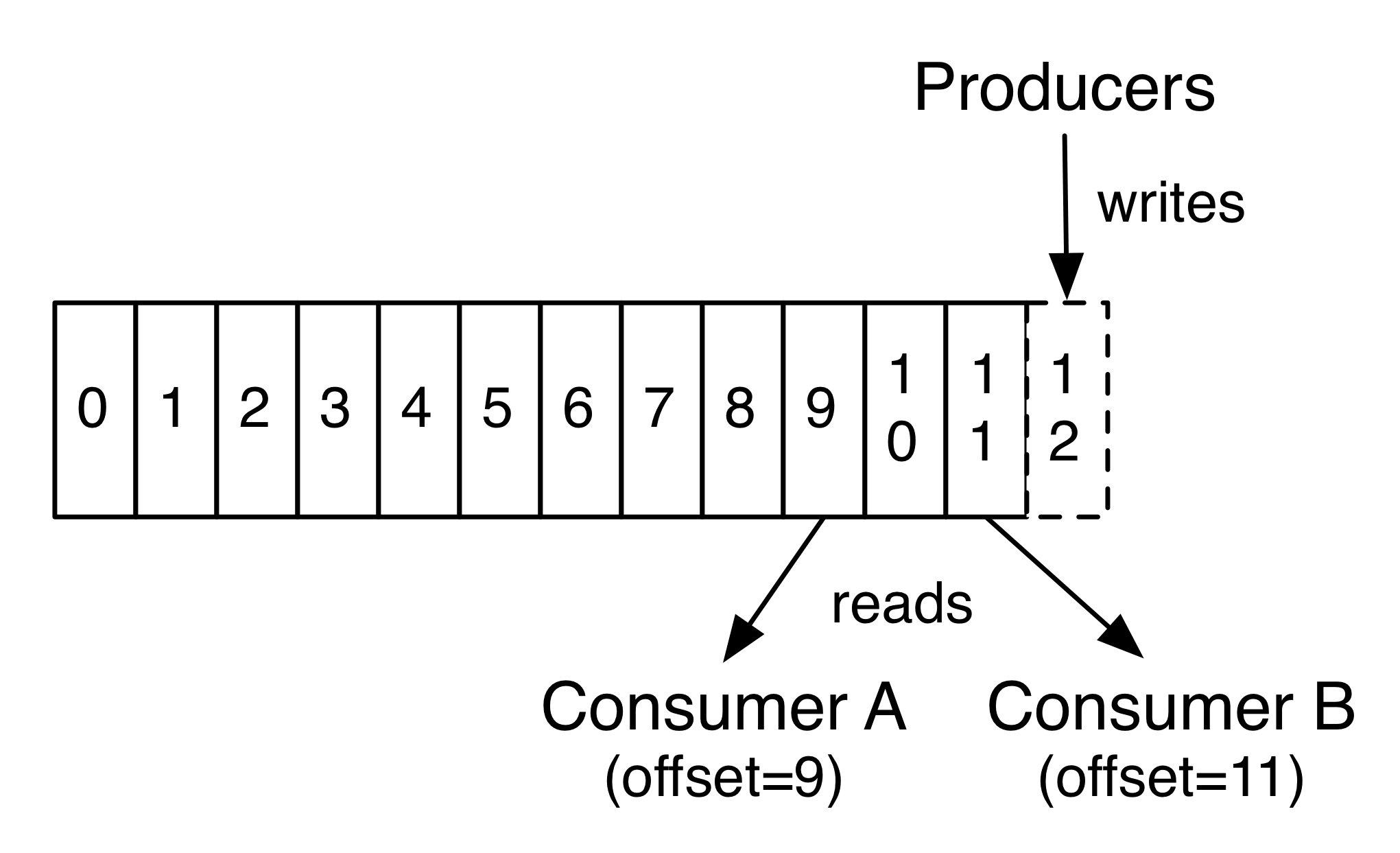
Consumers can read log messages from the broker, starting from a specific offset. Consumers are allowed to read from any offset point they choose. This allows consumers to join the cluster at any point in time.
A consumer can join a group, called a consumer group. A consumer group includes the set of consumer processes that are subscribing to a specific topic. Consumers in the group then divide the topic partitions fairly amongst themselves by establishing that each partition is only consumed by a single consumer from the group, I.e., each consumer in the group is assigned a set of partitions to consume from. Kafka guarantees that a message is only read by a single consumer in the group.

Make sure all consumers in a consumer group have a good connection

Partitions are redistributed between consumers every time a consumer connects or drop out of the consumer group. This means that consumers in the group are not able to consume messages during this time. If one consumer in a group has a bad connection, the whole group is affected and will be unavailable during every reconnect. A distribution of partitions takes around 2-3 seconds or longer. To make sure your setup is running smoothly, we strongly recommend you to secure the connection for your consumers.

Number of consumers

Ideally, the number of partitions should be equal to the number of consumers.
  • Number of consumer > number of partitions If the number of consumers is greater, some consumers will be idling, i.e., you will be wasting client resources.
  • Number of partitions > number of consumers Some consumers will read from multiple partitions if the number of partitions is greater than the number of consumers.
As mentioned before, the availability will be affected if one consumer has a bad connection. The more consumers you have, the larger risk there is, that one might drop and halt all other consumers.

Kafka and Kafka Performance Tuning

What is Kafka?

Apache Kafka® is a distributed streaming platform.

A streaming platform has three key capabilities:

Publish and subscribe to streams of records, similar to a message queue or enterprise messaging system.
Store streams of records in a fault-tolerant durable way.
Process streams of records as they occur.
Kafka is generally used for two broad classes of applications:

Building real-time streaming data pipelines that reliably get data between systems or applications
Building real-time streaming applications that transform or react to the streams of data

List the various components in Kafka.

The four major components of Kafka are:
  • Topic – a stream of messages belonging to the same type
  • Producer – that can publish messages to a topic
  • Brokers – a set of servers where the publishes messages are stored
  • Consumer – that subscribes to various topics and pulls data from the brokers.

Explain the role of the offset.

Messages contained in the partitions are assigned a unique ID number that is called the offset. The role of the offset is to uniquely identify every message within the partition.

What is a Consumer Group?

Consumer Groups is a concept exclusive to Kafka.  Every Kafka consumer group consists of one or more consumers that jointly consume a set of subscribed topics.

What is the role of the ZooKeeper in Kafka?

Kafka uses Zookeeper to store offsets of messages consumed for a specific topic and partition by a specific Consumer Group.

Is it possible to use Kafka without ZooKeeper?

No, it is not possible to bypass Zookeeper and connect directly to the Kafka server. If, for some reason, ZooKeeper is down, you cannot service any client request.

Explain the concept of Leader and Follower.

Every partition in Kafka has one server which plays the role of a Leader, and none or more servers that act as Followers. The Leader performs the task of all read and write requests for the partition, while the role of the Followers is to passively replicate the leader. In the event of the Leader failing, one of the Followers will take on the role of the Leader. This ensures load balancing of the server.

How do you define a Partitioning Key?

Within the Producer, the role of a Partitioning Key is to indicate the destination partition of the message. By default, a hashing-based Partitioner is used to determine the partition ID given the key. Alternatively, users can also use customized Partitions.
What is the purpose of retention period in Kafka cluster?
However, retention period retains all the published records within the Kafka cluster. It doesn’t check whether they have been consumed or not. Moreover, the records can be discarded by using a configuration setting for the retention period. And, it results as it can free up some space.
What is Mirror Maker ?
Mirror Maker tool helps to offer to mirror of one Kafka cluster to another.

Kafka Performance Tuning

Performance tuning involves two important metrics:
  • Latency measures how long it takes to process one event.
  • Throughput measures how many events arrive within a specific amount of time.
Most systems are optimized for either latency or throughput. Kafka is balanced for both. A well-tuned Kafka system has just enough brokers to handle topic throughput, given the latency required to process information as it is received.
Tuning your producers, brokers, and consumers to send, process, and receive the largest possible batches within a manageable amount of time results in the best balance of latency and throughput for your Kafka cluster.
The following sections introduce the concepts you'll need to be able to balance your Kafka workload and then provide practical tuning configuration to address specific circumstances.
For a quick video introduction to tuning Kafka, see Tuning Your Apache Kafka Cluster.

Tuning Brokers

Topics are divided into partitions. Each partition has a leader. Topics that are properly configured for reliability will consist of a leader partition and 2 or more follower partitions. When the leaders are not balanced properly, one might be overworked, compared to others.
Depending on your system and how critical your data is, you want to be sure that you have sufficient replication sets to preserve your data. For each topic, Cloudera recommends starting with one partition per physical storage disk and one consumer per partition.

Tuning Producers

Kafka uses an asynchronous publish/subscribe model. When your producer calls send(), the result returned is a future. The future provides methods to let you check the status of the information in process. When the batch is ready, the producer sends it to the broker. The Kafka broker waits for an event, receives the result, and then responds that the transaction is complete.
If you do not use a future, you could get just one record, wait for the result, and then send a response. Latency is very low, but so is throughput. If each transaction takes 5 ms, throughput is 200 events per second — slower than the expected 100,000 events per second.
When you use Producer.send(), you fill up buffers on the producer. When a buffer is full, the producer sends the buffer to the Kafka broker and begins to refill the buffer.
Two parameters are particularly important for latency and throughput: batch size and linger time.

Batch Size

batch.size measures batch size in total bytes instead of the number of messages. It controls how many bytes of data to collect before sending messages to the Kafka broker. Set this as high as possible, without exceeding available memory. The default value is 16384.
If you increase the size of your buffer, it might never get full. The Producer sends the information eventually, based on other triggers, such as linger time in milliseconds. Although you can impair memory usage by setting the buffer batch size too high, this does not impact latency.
If your producer is sending all the time, you are probably getting the best throughput possible. If the producer is often idle, you might not be writing enough data to warrant the current allocation of resources.

Linger Time

linger.ms sets the maximum time to buffer data in asynchronous mode. For example, the setting of 100 means that it batches 100ms of messages to send at once. This improves throughput, but the buffering adds message delivery latency.
By default, the producer does not wait. It sends the buffer any time data is available.
Instead of sending immediately, you can set linger.ms to 5 and send more messages in one batch. This would reduce the number of requests sent, but would add up to 5 milliseconds of latency to records sent, even if the load on the system does not warrant the delay.
The farther away the broker is from the producer, the more overhead required to send messages. Increase linger.ms for higher latency and higher throughput in your producer.

Tuning Consumers

Consumers can create throughput issues on the other side of the pipeline. The maximum number of consumers in a consumer group for a topic is equal to the number of partitions. You need enough partitions to handle all the consumers needed to keep up with the producers.
Consumers in the same consumer group split the partitions among them. Adding more consumers to a group can enhance performance (up to the number of partitions). Adding more consumer groups does not affect performance.

Wednesday, October 19, 2016

Introduction to Apache Kafka

Introduction

Kafka is a distributed streaming platform. What exactly does that mean?

We think of a streaming platform as having three key capabilities:
  1. It let's you publish and subscribe to streams of records. In this respect it is similar to a message queue or enterprise messaging system.
  2. It let's you store streams of records in a fault-tolerant way.
  3. It let's you process streams of records as they occur.
What is Kafka good for?
It gets used for two broad classes of application:
  1. Building real-time streaming data pipelines that reliably get data between systems or applications
  2. Building real-time streaming applications that transform or react to the streams of data
To understand how Kafka does these things, let's dive in and explore Kafka's capabilities from the bottom up.
First a few concepts:
  • Kafka is run as a cluster on one or more servers.
  • The Kafka cluster stores streams of records in categories called topics.
  • Each record consists of a key, a value, and a timestamp.
Kafka has four core APIs:
  • The Producer API allows an application to publish a stream records to one or more Kafka topics.
  • The Consumer API allows an application to subscribe to one or more topics and process the stream of records produced to them.
  • The Streams API allows an application to act as a stream processor, consuming an input stream from one or more topics and producing an output stream to one or more output topics, effectively transforming the input streams to output streams.
  • The Connector API allows building and running reusable producers or consumers that connect Kafka topics to existing applications or data systems. For example, a connector to a relational database might capture every change to
In Kafka the communication between the clients and the servers is done with a simple, high-performance, language agnostic TCP protocol. This protocol is versioned and maintains backwards compatibility with older version. We provide a Java client for Kafka, but clients are available in many languages.

In Kafka:
  • Kafka maintains the messages feeds in categories called Topics
  • Process which publish messages to a Kafka topic is called as Producer
  • Process which consumes messages from a Kafka topic is called as Consumer
  • All the above components are coordinated and managed via Kafka Broker. This broker or cluster could be set of physical servers.

Topics and Logs

Let's first dive into the core abstraction Kafka provides for a stream of records—the topic.
A topic is a category or feed name to which records are published. Topics in Kafka are always multi-subscriber; that is, a topic can have zero, one, or many consumers that subscribe to the data written to it.
For each topic, the Kafka cluster maintains a partitioned log that looks like this:
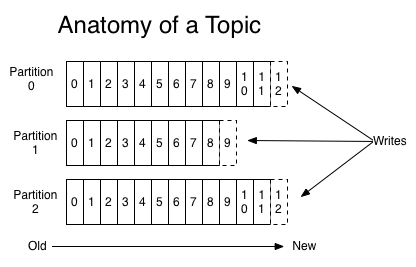
Each partition is an ordered, immutable sequence of records that is continually appended to—a structured commit log. The records in the partitions are each assigned a sequential id number called the offset that uniquely identifies each record within the partition.
The Kafka cluster retains all published records—whether or not they have been consumed—using a configurable retention period. For example if the retention policy is set to two days, then for the two days after a record is published, it is available for consumption, after which it will be discarded to free up space. Kafka's performance is effectively constant with respect to data size so storing data for a long time is not a problem.

In fact, the only metadata retained on a per-consumer basis is the offset or position of that consumer in the log. This offset is controlled by the consumer: normally a consumer will advance its offset linearly as it reads records, but, in fact, since the position is controlled by the consumer it can consume records in any order it likes. For example a consumer can reset to an older offset to reprocess data from the past or skip ahead to the most recent record and start consuming from "now".
This combination of features means that Kafka consumers are very cheap—they can come and go without much impact on the cluster or on other consumers. For example, you can use our command line tools to "tail" the contents of any topic without changing what is consumed by any existing consumers.
The partitions in the log serve several purposes. First, they allow the log to scale beyond a size that will fit on a single server. Each individual partition must fit on the servers that host it, but a topic may have many partitions so it can handle an arbitrary amount of data. Second they act as the unit of parallelism—more on that in a bit.

Distribution

The partitions of the log are distributed over the servers in the Kafka cluster with each server handling data and requests for a share of the partitions. Each partition is replicated across a configurable number of servers for fault tolerance.
Each partition has one server which acts as the "leader" and zero or more servers which act as "followers". The leader handles all read and write requests for the partition while the followers passively replicate the leader. If the leader fails, one of the followers will automatically become the new leader. Each server acts as a leader for some of its partitions and a follower for others so load is well balanced within the cluster.

Producers

Producers publish data to the topics of their choice. The producer is responsible for choosing which record to assign to which partition within the topic. This can be done in a round-robin fashion simply to balance load or it can be done according to some semantic partition function (say based on some key in the record). More on the use of partitioning in a second!

Consumers

Consumers label themselves with a consumer group name, and each record published to a topic is delivered to one consumer instance within each subscribing consumer group. Consumer instances can be in separate processes or on separate machines.
If all the consumer instances have the same consumer group, then the records will effectively be load balanced over the consumer instances.
If all the consumer instances have different consumer groups, then each record will be broadcast to all the consumer processes.
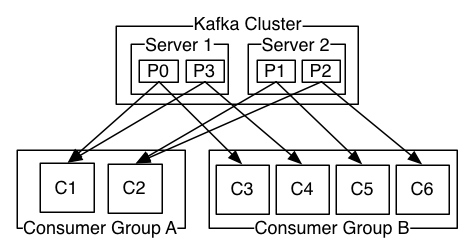
A two server Kafka cluster hosting four partitions (P0-P3) with two consumer groups. Consumer group A has two consumer instances and group B has four.
More commonly, however, we have found that topics have a small number of consumer groups, one for each "logical subscriber". Each group is composed of many consumer instances for scalability and fault tolerance. This is nothing more than publish-subscribe semantics where the subscriber is a cluster of consumers instead of a single process.
The way consumption is implemented in Kafka is by dividing up the partitions in the log over the consumer instances so that each instance is the exclusive consumer of a "fair share" of partitions at any point in time. This process of maintaining membership in the group is handled by the Kafka protocol dynamically. If new instances join the group they will take over some partitions from other members of the group; if an instance dies, its partitions will be distributed to the remaining instances.
Kafka only provides a total order over records within a partition, not between different partitions in a topic. Per-partition ordering combined with the ability to partition data by key is sufficient for most applications. However, if you require a total order over records this can be achieved with a topic that has only one partition, though this will mean only one consumer process per consumer group.

Guarantees

At a high-level Kafka gives the following guarantees:
  • Messages sent by a producer to a particular topic partition will be appended in the order they are sent. That is, if a record M1 is sent by the same producer as a record M2, and M1 is sent first, then M1 will have a lower offset than M2 and appear earlier in the log.
  • A consumer instance sees records in the order they are stored in the log.
  • For a topic with replication factor N, we will tolerate up to N-1 server failures without losing any records committed to the log.
More details on these guarantees are given in the design section of the documentation.

Kafka as a Messaging System

How does Kafka's notion of streams compare to a traditional enterprise messaging system?
Messaging traditionally has two models: queuing and publish-subscribe. In a queue, a pool of consumers may read from a server and each record goes to one of them; in publish-subscribe the record is broadcast to all consumers. Each of these two models has a strength and a weakness. The strength of queuing is that it allows you to divide up the processing of data over multiple consumer instances, which lets you scale your processing. Unfortunately queues aren't multi-subscriber—once one process reads the data it's gone. Publish-subscribe allows you broadcast data to multiple processes, but has no way of scaling processing since every message goes to every subscriber.
The consumer group concept in Kafka generalizes these two concepts. As with a queue the consumer group allows you to divide up processing over a collection of processes (the members of the consumer group). As with publish-subscribe, Kafka allows you to broadcast messages to multiple consumer groups.
The advantage of Kafka's model is that every topic has both these properties—it can scale processing and is also multi-subscriber—there is no need to choose one or the other.
Kafka has stronger ordering guarantees than a traditional messaging system, too.
A traditional queue retains records in-order on the server, and if multiple consumers consume from the queue then the server hands out records in the order they are stored. However, although the server hands out records in order, the records are delivered asynchronously to consumers, so they may arrive out of order on different consumers. This effectively means the ordering of the records is lost in the presence of parallel consumption. Messaging systems often work around this by having a notion of "exclusive consumer" that allows only one process to consume from a queue, but of course this means that there is no parallelism in processing.
Kafka does it better. By having a notion of parallelism—the partition—within the topics, Kafka is able to provide both ordering guarantees and load balancing over a pool of consumer processes. This is achieved by assigning the partitions in the topic to the consumers in the consumer group so that each partition is consumed by exactly one consumer in the group. By doing this we ensure that the consumer is the only reader of that partition and consumes the data in order. Since there are many partitions this still balances the load over many consumer instances. Note however that there cannot be more consumer instances in a consumer group than partitions.

Kafka as a Storage System

Any message queue that allows publishing messages decoupled from consuming them is effectively acting as a storage system for the in-flight messages. What is different about Kafka is that it is a very good storage system.
Data written to Kafka is written to disk and replicated for fault-tolerance. Kafka allows producers to wait on acknowledgement so that a write isn't considered complete until it is fully replicated and guaranteed to persist even if the server written to fails.
The disk structures Kafka uses scale well—Kafka will perform the same whether you have 50 KB or 50 TB of persistent data on the server.
As a result of taking storage seriously and allowing the clients to control their read position, you can think of Kafka as a kind of special purpose distributed filesystem dedicated to high-performance, low-latency commit log storage, replication, and propagation.

Kafka for Stream Processing

It isn't enough to just read, write, and store streams of data, the purpose is to enable real-time processing of streams.
In Kafka a stream processor is anything that takes continual streams of data from input topics, performs some processing on this input, and produces continual streams of data to output topics.
For example a retail application might take in input streams of sales and shipments, and output a stream of reorders and price adjustments computed off this data.
It is possible to do simple processing directly using the producer and consumer APIs. However for more complex transformations Kafka provides a fully integrated Streams API. This allows building applications that do non-trivial processing that compute aggregations off of streams or join streams together.
This facility helps solve the hard problems this type of application faces: handling out-of-order data, reprocessing input as code changes, performing stateful computations, etc.
The streams API builds on the core primitives Kafka provides: it uses the producer and consumer APIs for input, uses Kafka for stateful storage, and uses the same group mechanism for fault tolerance among the stream processor instances.

Putting the Pieces Together

This combination of messaging, storage, and stream processing may seem unusual but it is essential to Kafka's role as a streaming platform.
A distributed file system like HDFS allows storing static files for batch processing. Effectively a system like this allows storing and processing historical data from the past.
A traditional enterprise messaging system allows processing future messages that will arrive after you subscribe. Applications built in this way process future data as it arrives.
Kafka combines both of these capabilities, and the combination is critical both for Kafka usage as a platform for streaming applications as well as for streaming data pipelines.
By combining storage and low-latency subscriptions, streaming applications can treat both past and future data the same way. That is a single application can process historical, stored data but rather than ending when it reaches the last record it can keep processing as future data arrives. This is a generalized notion of stream processing that subsumes batch processing as well as message-driven applications.
Likewise for streaming data pipelines the combination of subscription to real-time events make it possible to use Kafka for very low-latency pipelines; but the ability to store data reliably make it possible to use it for critical data where the delivery of data must be guaranteed or for integration with offline systems that load data only periodically or may go down for extended periods of time for maintenance. The stream processing facilities make it possible to transform data as it arrives.
For more information on the guarantees, apis, and capabilities Kafka provides see the rest of the documentation.

List the various components in Kafka.

The four major components of Kafka are:
  • Topic – a stream of messages belonging to the same type
  • Producer – that can publish messages to a topic
  • Brokers – a set of servers where the publishes messages are stored
  • Consumer – that subscribes to various topics and pulls data from the brokers.

What is the role of the ZooKeeper?

Kafka uses Zookeeper to store offsets of messages consumed for a specific topic and partition by a specific Consumer Group.

Is it possible to use Kafka without ZooKeeper?

No, it is not possible to bypass Zookeeper and connect directly to the Kafka server. If, for some reason, ZooKeeper is down, you cannot service any client request.

What is the process for starting a Kafka server?

Since Kafka uses ZooKeeper, it is essential to initialize the ZooKeeper server, and then fire up the Kafka server.
  • To start the ZooKeeper server: > bin/zookeeper-server-start.sh config/zookeeper.properties
  • Next, to start the Kafka server: > bin/kafka-server-start.sh config/server.properties
How to create a topic?
Create a topic named “test” with a single partition and only one replica:
> bin/kafka-topics.sh –create –zookeeper localhost:2181 –replication-factor 1 –partitions 1 –topic test
How Kafka depends on Zookeeper?
Zookeeper is an open source, high-performance co-ordination service used for distributed applications adapted by Kafka. No, it is not possible to bye-pass Zookeeper and connect straight to the Kafka broker. Once the Zookeeper is down, it cannot serve client request. 
Zookeeper is basically used to communicate between different nodes in a cluster in Kafka, it is used to commit offset, so if node fails in any case it can be retrieved from the previously committed offset.
The brokers depend on Zookeeper for:
1.Server failure detection.
2.Data partitioning.
3.In-sync data replication.
4.Consumer membership management.

Kafka Vs Flume

1Kafka is a publish-subscribe model messaging system, which offers strong durability, scalabitity and fault-tolerance support.Flume is a distributed, reliable, and available system for efficiently collecting, aggregating, and moving large amounts of data from many different sources to a centralized data store, such as HDFS
2Kafka Provides a back pressure to prevent overflowing a brokerFlume/Flume NG doesn’t provide any such a functionality
3With Kafka you pull data, so each consumer has and manages it's own read pointer. This allows a large number of consumers of each Kafka queue, that pull data at their own pace. With this, you could deliver your event streams to HBase, Cassandra, Storm, Hadoop, RDBMS all in parallel.To get data out of Flume, you use a sink, which writes to your target store (HDFS, HBase, Cassandra etc). Flume will re-try connections to your sinks if they are offline. Because Flume pushes data, you have to do some interesting work to sink data to two data stores
5With Kafka 0.8+ you get replication of your event data. If you lose a broker node, others will take up the slack to delivery your events without loss.With Flume & FlumeNG, and a File channel, if you loose a broker node you will lose access to those events until you recover that disk. The database channel with Flume is reported too slow for any production use cases at volume.
6Kafka just provides messagingFlume Provides number of pre built collectors
7Kafka’s main use-case is a distributed publish-subscribe messaging system. Most of the development effort is involved with allowing subscribers to read exactly the messages they are interested in, and in making sure the distributed system is scalable and reliable under many different conditions. It was not written to stream data specifically for Hadoop, and using it to read and write data to Hadoop is significantly more challenging than it is in Flume.Flume’s main use-case is to ingest data into Hadoop. It is tightly integrated with Hadoop’s monitoring system, file system, file formats, and utilities such a Morphlines. A lot of the Flume development effort goes into maintaining compatibility with Hadoop. Sure, Flume’s design of sources, sinks and channels mean that it can be used to move data between other systems flexibly, but the important feature is its Hadoop integration.
8Use Kafka if you need a highly reliable and scalable enterprise messaging system to connect many multiple systems, one of which is HadoopUse Flume if you have an non-relational data sources such as log files that you want to stream into Hadoop.